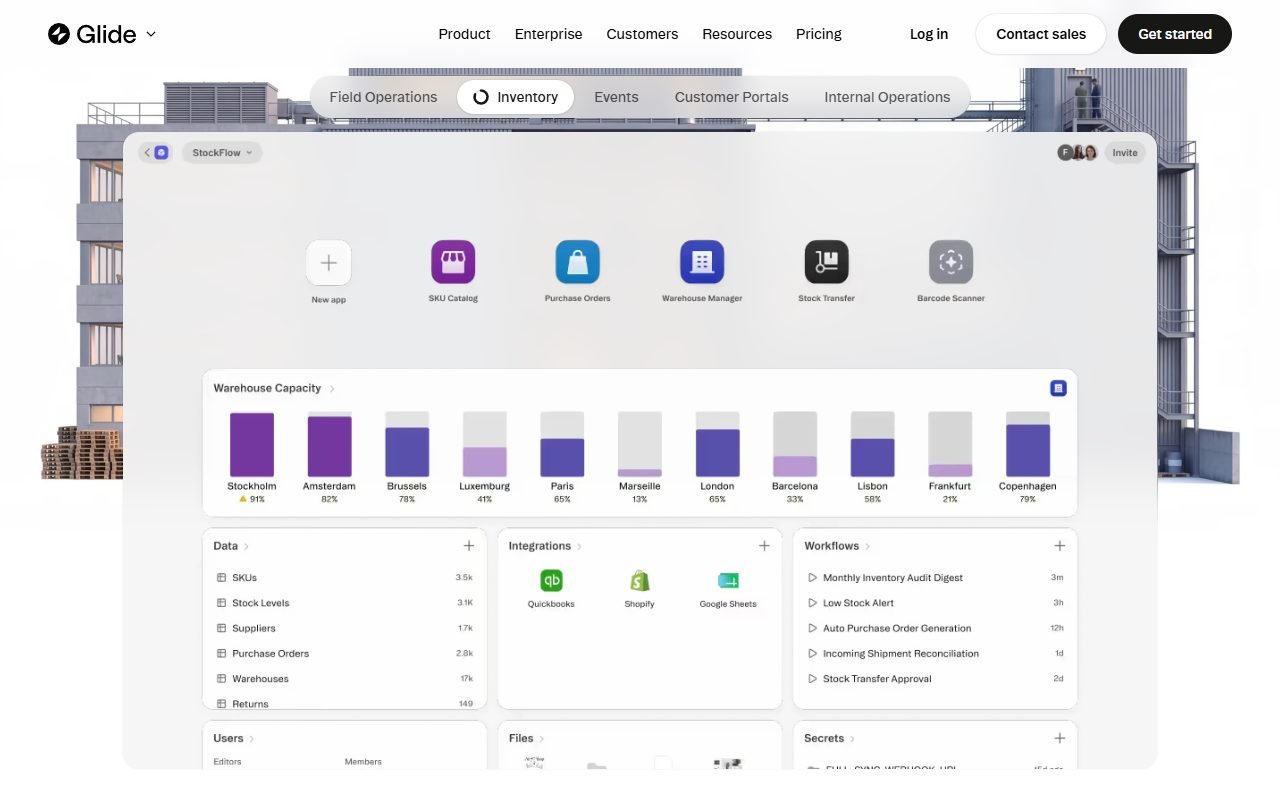
Glide is a candidate for operations teams with structured data that need an internal app, inventory tool, field workflow, or portal without writing the frontend. Important checks include data-source support, user counts, and row or update limits.
Test each role with separate accounts and check mobile or offline behavior against your actual needs. The information was checked on 1 August 2026; PickByTask has not tested it with real data and users.
Contents — jump to a section
Ideal job
Glide Tables and connectors feed data to components, actions, and workflows, so they're better suited to lists/forms/dashboards than deep custom software logic.
Data model
Check computed columns, relations, sync latency, and update counting with real datasets. Don't measure across ten rows.
 Visit Glide ↗
Roles and security
Row Owners/roles must be tested with direct URL/API, not visibility as security. Check security center and current docs.
Mobile boundary
Mobile-first appearance is not equal to native/offline in every case. Install, camera/upload, weak network and notification must be tested according to requirements.
price
pricing Change according to users/updates/rows/features. Organize TCO by separating plan, data source, automation and overage every 30 days.
Visit Glide ↗Ownership/export
Test export data, app configuration boundary, backup and rebuild path before binding important operations.
External reviews
G2, Capterra, GetApp, Software Advice, Product Hunt, Trustpilot, TechRadar and NoCode.Tech praised the speed/templates/mobile UI; The concern is that the pricing limits, customization, performance, and permission complexity of the Gartner pool do not account for full autonomy.
Workflow Scenario: Field Inventory where the network is uncertain
Create a stock-taking app for 20 employees, 10,000 product records, and 4 warehouses. Users can scan/search products, enter quantities, take photos, and submit adjustments. Only assigned warehouses are visible. Supervisors can approve and export reports. Start with a Glide Table baseline and experiment with external connectors to measure different syncs.
Test for a slow signal, turn off the network during submission, open the same record on two machines, and repeat the action. Check that the system shows pending/error How and does duplicate update occur? If the requirement is offline-first, field flow must be verified at every step, not using the sense from the install icon on the screen.
Tables, Computed Columns and Actions
| part | value | Required evidence |
|---|---|---|
| Glide Tables | Built-in data source and fast startup | row/update quota, export and backup |
| Relations/lookups | Sync data without writing a query | correctness with missing/duplicate keys |
| Computed columns | Create derived state | refresh timing and scale cost |
| Components | Assemble mobile-like UI | accessible label, empty/error, device sizes |
| Actions/workflows | update/notify/integrate | idempotency, failure log and permissions |
| Row Owners/roles | limited record | direct URL/search/cache/adversarial test |
Glide docs and the Row Owners page provide evidence for mechanics only. Accuracy scores must come from the test dataset.
Visit Glide ↗Pricing/TCO by Rows, Users and Updates
| unit | How to measure |
|---|---|
| Users | active/internal/external according to the current plan definition |
| Rows | Each source type and counted limits |
| Updates | sync, action, computed/automation behavior counted |
| Integrations | API/provider quota and task fees |
| Media/storage | Images from field, retention and egress |
| Operations | support, admin, cleanup and migration |
Confirm the quantity from Glide pricing on the approval day. Create a cost model of 20/100 users and 1k/10k/100k rows because the entry price does not say which limit the actual workflow hits first.
Review Consensus and Dissent
Users in G2/Gartner pools and communities praise routes from spreadsheet/data to a usable interface with quick-to-learn components. Editorial reviews help place Glide among internal apps. Trustpilot/community warns about billing, limits and support.
There are positives: CRUD/list app startup speed does not necessarily mean complex data models are equally fast. Negative aspects that influence decisions include update/row pricing, customization ceiling, performance, and security configuration. It doesn't average stars or claim the number of reviews as quality.
Security and Privacy in Data App
Row Owners must be set in a secure columns/data path and tested with different accounts. Hiding tabs/components is not authorization. Restrict personal data in notification/log, check for connector token, shared link, file upload and account removal. If using Google Sheets/Airtable, include permissions for that source in the threat model.
Ownership, Export and Offline Boundary
Data export is not equivalent to export application UI/logic. Record the schema, computed columns, actions, visibility, and integrations to evaluate the rebuild path. Test whether the image/attachment How do I exit and does the deleted account still have an outstanding record?
The word mobile app must specify the actual output—PWA/installable/native. wrapper/app-store/offline—according to the docs on the test date. Do not use them interchangeably because notification, storage and background sync are different.
Operational Decision Matrix
| Requirement | Fit |
|---|---|
| Mobile-like internal CRUD | High when limits passed |
| Spreadsheet-to-app prototype | high |
| Offline-first field mission | Must be rigorously tested |
| Complex multi-tenant portal | Softr/Bubble should be compared. |
| Native app-store requirement | Not yet confirmed from appearance |
| Source-code export | It shouldn't be expected without docs/test. |
strength
Get started with data quickly, components/actions are easy to understand, suitable for operational workflow.
Limitations
usage scale changes price, complex UI/logic is more limited than custom stack, and offline/native needs to be proven
Decision matrix
Choose Glide when a mobile-like data app is important; Choose Softr for portal/web layout or Bubble for deeper logic. Link /compare/softr-vs-glide/
Criteria for terminating the experiment before the budget expires
Stop the pilot and restart the design if update usage grows many times faster than the number of business transactions, record restriction requires visibility workarounds, employees create duplicate transactions when network drops, or exports do not include attachments/audits. that the organization must keep These problems should not be solved by adding a plan before knowing the cause.
On the other hand, if the team can create an inventory flow with clear action, the new user completes the task without extensive training, and the cost of 10,000 records is still within the budget glide, there is reason to enter a controlled production pilot with monitoring and approval from the responsible person.
Additional FAQs
What is the difference between Row Owners and hidden components?
Row Owners are responsible for limiting data access, while visibility controls the UI; You must use a security mechanism, not just hide your face.
Can I use Google Sheets as a production database?
Depending on volume, concurrency, sync and governance, a load/conflict test must not be concluded from a successful connection.
How are updates counted?
The definition changes accordingly. plan/source/action You should read the pricing/docs and look directly at the fixture's usage dashboard.
You should use Glide Tables or the same data source.
Starting with rights Freshness of data, volume, and system owner. If two-way sync is required, test conflict/latency; If moving into Glide Tables, have the export/backup owner clearly specified.
FAQ
There is Free entry according to limits; Supports multiple data sources as planned; Thai UI/search not yet confirmed; security depends on role/configuration