
A useful AI project for a volunteer repair event is a small intake kit: one form, one item label and one handoff checklist. The important result is that an item stays connected to its record. It is not an automated diagnosis or a promise that the repair will succeed.
Jotform documents form features, while Canva presents writing and design tools. Consider these as separate places to collect structured information and lay out the label. Copying a checked item ID manually is enough for a first trial; this guide assumes no integration. Jotform features · Canva
Contents — jump to a section
Define one item record
Use three fictional items: a desk lamp, a small fan and a radio. Give them IDs R001, R002 and R003. Record the item description, what the person noticed, visible condition and the next handoff. Describe symptoms without guessing their cause.
Keep private contact information in the organiser's controlled record, not on a label visible to everyone. Use an owner code on the sample label. Real retention and consent arrangements need to fit the actual event; the exercise does not establish a legal policy.
Draft questions from the handoff
Help draft an intake kit for a volunteer repair event.
Output: a short form, an item label and a handoff checklist.
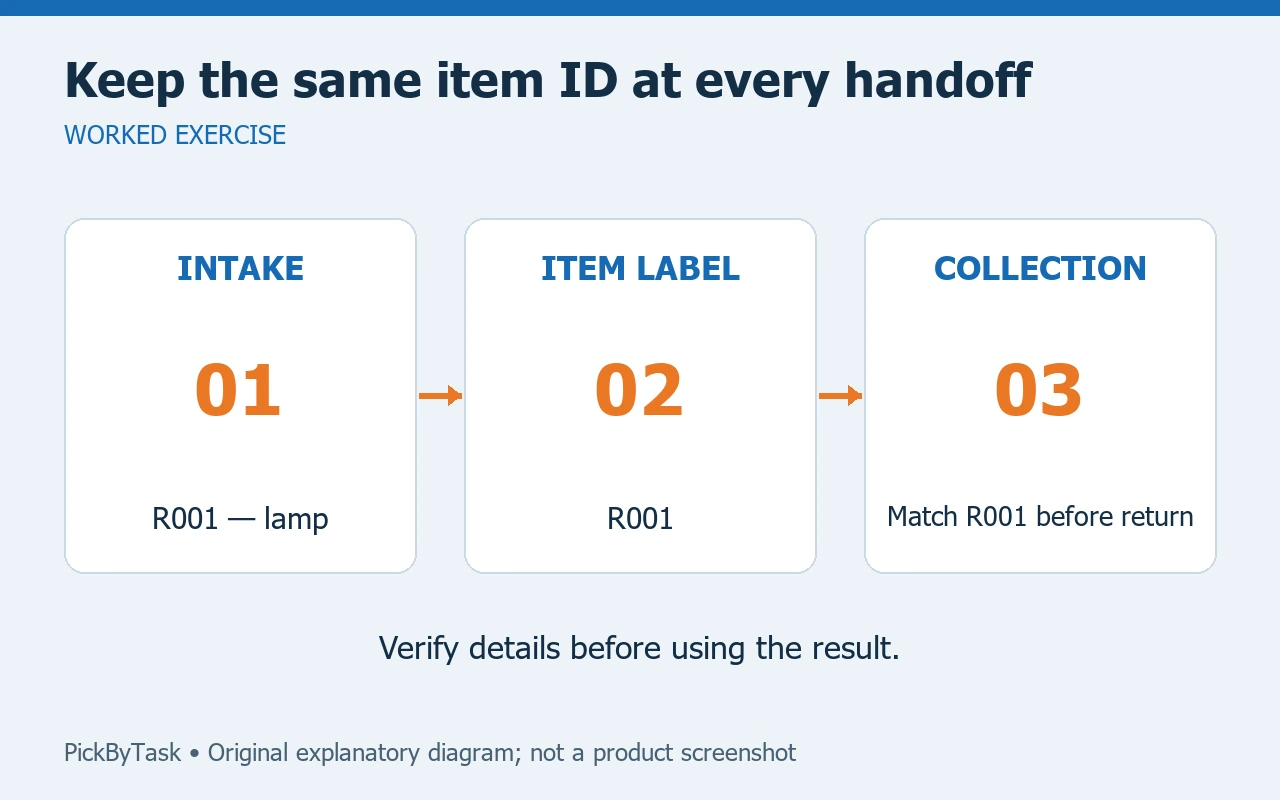
Use an item ID to connect all three.
Ask what the owner observed; do not diagnose a fault or promise repair.
Put private contact details only in the organiser's record.
Use fictional item R001, a lamp that does not turn on.
Flag any decision the organiser must make before using the kit.
A useful symptom field says, “What happens when you try to use it?” Avoid a required “Which component is broken?” field that forces the visitor to guess. Keep “not yet assessed” separate from “cannot repair.”
Assemble and try the kit
- Create the record fields and assign the sample IDs once. Do not let AI invent a second ID in the label text.
- Draft a label showing item ID, item type and current stage. Keep personal contact details off it.
- Define a small set of stages, such as received, awaiting assessment and returned. The volunteers must agree on their meanings.
- Move the three fictional items through a paper handoff. The receiving person checks the label ID against the record.
- Record a return and verify that the item, record and owner code still match. An unresolved mismatch stops the handoff.
For R001, a consistent trail might read: label R001, record “desk lamp; does not turn on,” stage “awaiting assessment.” A generated note saying “needs a new switch” would be an unsupported diagnosis. Remove it unless a qualified person actually makes that finding.
Test the awkward cases
Try two similar lamps, a label that comes loose and a visitor who returns with the wrong code. The kit should make the uncertainty visible instead of silently selecting the closest match. Keep spare blank labels and a paper log so an internet failure does not erase the item trail.
This project does not provide electrical-repair instructions. Intake staff should follow the event's actual safety process and refer technical decisions to the responsible repairer.
Choose a sensible first version
Plan roughly an hour for drafting and a short volunteer walkthrough, as an estimate. A spreadsheet and paper labels are enough to establish the process before paying for forms or design features. Check account limits and chosen asset permissions when moving the prototype into a tool.
The project passes when another volunteer can follow all three sample items from receipt to return without guessing identity, status or responsibility. A later improvement could print labels from approved records, but only after the manual trail works. See our intake and human-handoff guide for related routing concepts.
Product-role sources were inspected on 2026-09-14. The kit is a proposed exercise; no event, integration, diagnosis or account workflow was tested.