
A project can sound useful while still being difficult to describe as a single request and a finished result. Before connecting an AI model to forms, databases and notifications, process five fictional requests yourself. This checks whether the workflow makes sense. It cannot prove that real customers want the service.
For this exercise, imagine a service that turns a club organiser's event notes into a short announcement. A request contains an event name, audience, confirmed time, location and contact method. The result is one draft announcement with unresolved details clearly listed.
Contents — jump to a section
Define the result before choosing tools
Write a one-sentence promise: “Send your confirmed event details and receive an announcement draft for your own review.” Avoid promising instant delivery or error-free publication while neither has been demonstrated.
Jotform lists conditional form features, and Framer provides website creation tools. They are candidates for collecting requests and presenting the service, respectively. This exercise does not assume an integration between them or a particular paid plan. Jotform features · Framer
Make five different sample requests
Use invented names and contact details. Prepare one complete request, one missing its time, one with two conflicting locations, one that asks for an unsupported claim, and one whose announcement is already clear.
For each, decide whether the appropriate result is a draft, a clarification question or no rewrite. A system that always generates a polished paragraph will hide important differences between these cases.
Try this prompt in a writing assistant you already use:
Turn the supplied event details into a short announcement. Use only those details. If the time or location is missing or conflicting, ask for clarification before drafting. Do not invent attendance numbers, endorsements or promises. Return a draft only when the essential information is consistent.
The prompt is a starting point for evaluation, not a guarantee that the assistant will follow every instruction.
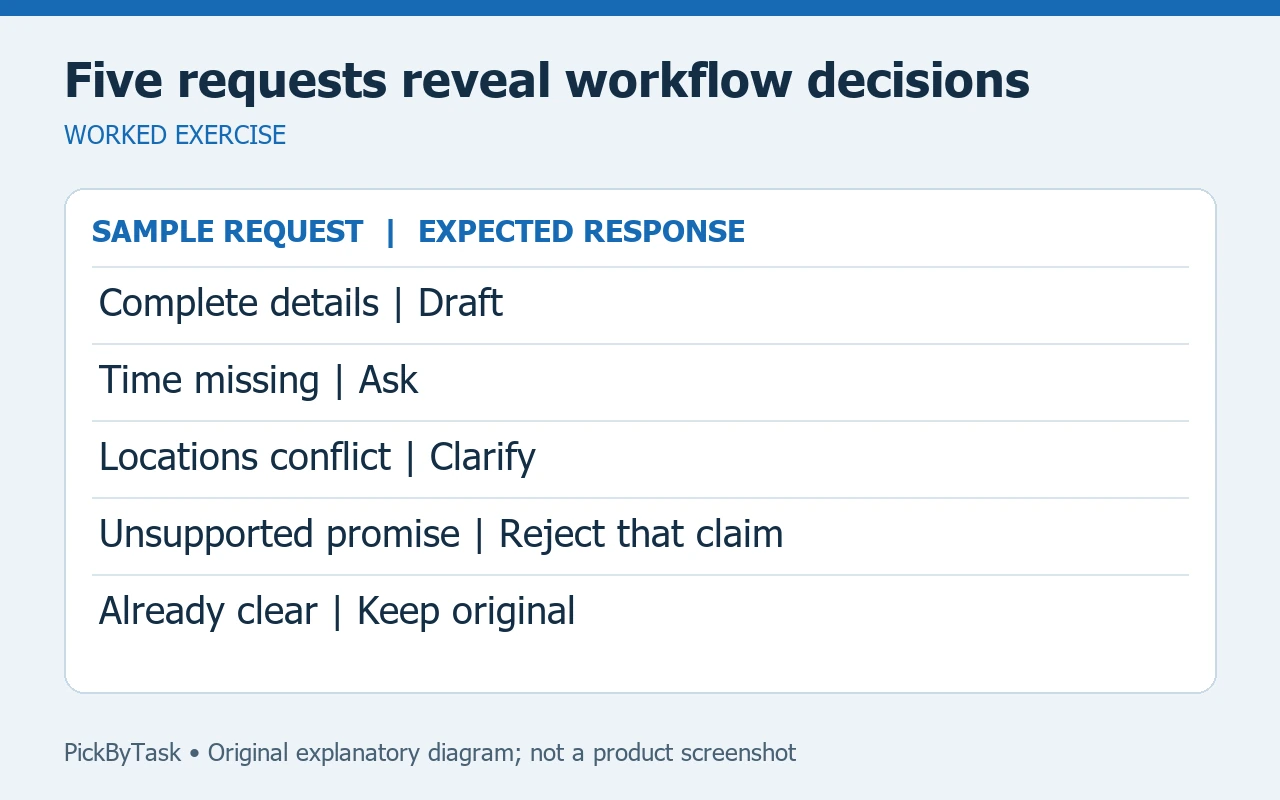
Run the process manually
- Copy one sample into a private working document.
- Identify missing or conflicting facts before requesting any AI output.
- Produce a draft or clarification question.
- Check every name, time, place and promise against the input.
- Record what you changed and why before moving to the next sample.
Use a small log with request number, expected response type, actual response type, corrections and elapsed time. Record observed times; do not fill the log with estimates presented as results.
Decide what is worth automating
If several requests need the same clarification, improve the intake question first. For example, separate the event date from the response deadline so the two cannot be mistaken for each other.
If the manual result is useful but copying inputs is repetitive, that is a candidate for later automation. If the result still needs extensive judgment, keep a review step. Do not build a complex workflow merely because a tool offers an integration.
A form and a service page are optional at this stage. Paper or a local document can answer the workflow question before you spend money. If you build a prototype, check the current account limits and test it privately before opening it to real requests.
Separate feasibility from demand
Five fictional samples test your process, not customer interest. After the process works, show the actual example to an intended reader and ask what they would use, ignore or change. Record their response without treating one positive comment as market validation.
A useful stopping point is a clear input template, five reviewed outputs and a list of recurring decisions. This is a proposed exercise; no product performance or customer demand has been measured here.
Read the Jotform guide for the intake tool and the Framer guide for the service-page option. Provider capabilities were checked on 14 September 2026; plan-specific access should be checked before purchase.