
Give each shot one job: show a problem, show a change, then show its consequence. Create a still for each job, animate the stills separately and build the timing in an editor. This gives you something specific to repair when a clip fails, instead of asking one generation to invent the entire film.
Our original exercise is a small story about a red toy sailboat caught beside a reed. A pulse of water frees it; the boat drifts into a sunlit part of the stream. The finished film targets 20 seconds, with no dialogue or people. These are proposed production steps and prompts, not a tested Higgsfield or Krea workflow. Official product pages were checked on September 9, 2026.
Contents — jump to a section
Write the cut before writing the prompt
The boat must travel screen-left to screen-right throughout. Keep a grey pebble behind the reed as a location marker. Light enters from the upper right. A white triangular sail and a red hull identify the boat; omit logos and small lettering.
| Edit time | Shot and purpose | Single main action | Camera | Cut point |
|---|---|---|---|---|
| 0–6 sec | Wide: the boat is caught | It rocks gently against the reed | Locked | After the rocking makes the obstruction clear |
| 6–12 sec | Close: the obstacle releases | Water carries the boat clear of the reed | Locked | After the hull has visibly cleared |
| 12–20 sec | Wider: it can travel again | Boat drifts toward the sunlit right side | Locked | Hold after it enters the bright water |
The six- and eight-second figures are editing targets. Generate enough footage to retain those moments, with spare time at the start and end. If the action finishes sooner, shorten the film; a padded 20-second edit is weaker than a clear 16-second story.
1. Generate the first frame and establish the boat
Use Higgsfield's AI Image workflow with Nano Banana Pro if available. The product page lists multiple image models and describes moving an image into video generation. We choose a reference-capable image model because the later stills need the same boat. Verify that the active mode accepts your image before relying on reference instructions. Higgsfield AI Image
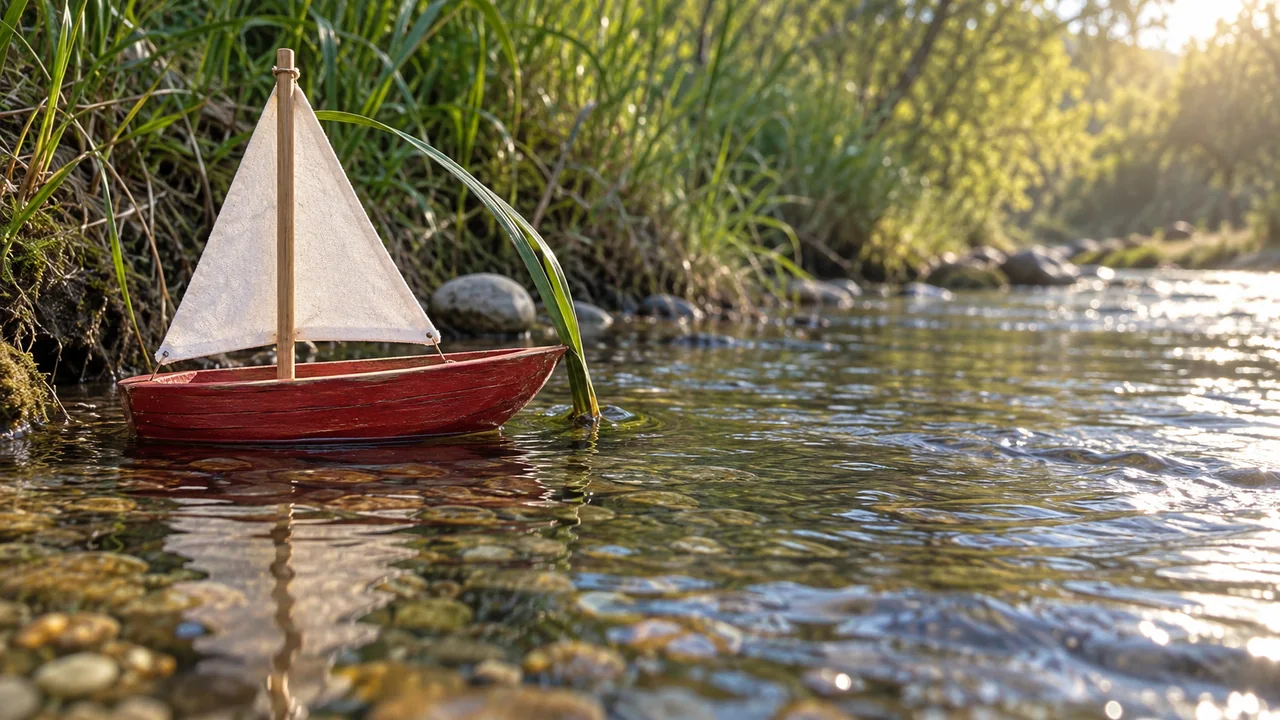
Input: text only. Settings: 16:9 where available. Use the ordinary image output first; do not upscale a boat with incorrect geometry.
One small red wooden toy sailboat with a single plain white triangular sail rests in a shallow clear stream. Its bow points screen-right and lightly touches one bent green reed near the bank. A smooth grey pebble sits behind the reed. Wide view from low on the bank, with the entire boat visible and open water to its right. Late-afternoon sunlight enters from upper right, leaving the boat in soft shade and a bright patch farther downstream. Natural water surface and miniature wooden details. One continuous photograph, no collage or lettering.Check that the reed touches the hull rather than passing through it. Approve the sail shape and mast attachment. Save this as boat-wide-master; every later image should refer back to it.
2. Create the close-up and the destination still
Attach the master to the same reference-capable image model. Generate the two prompts below separately. Do not ask for a contact sheet and then feed the whole grid to the video model: each start image needs to contain exactly one shot.
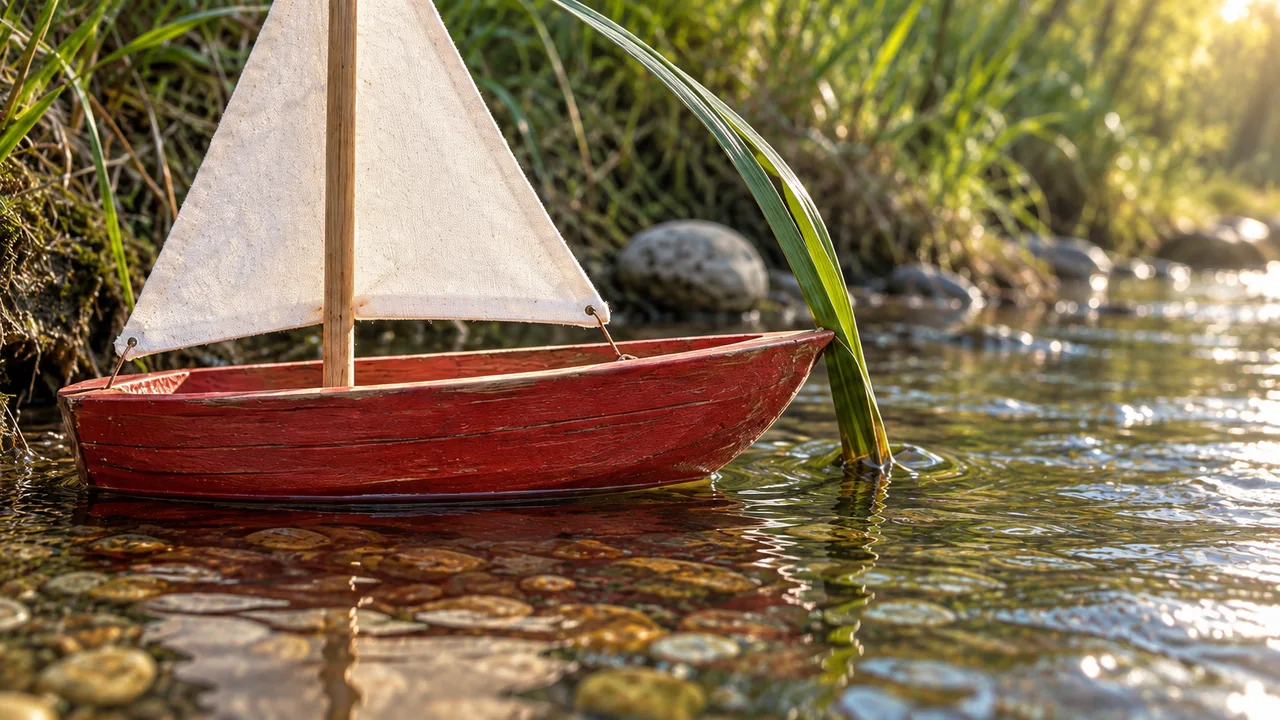
Close-up input: the approved wide master. Settings: the same aspect ratio and image model.
Use the attached stream image as the reference for the same red toy sailboat, white triangular sail, bent green reed and grey pebble. Create one closer view from the same bank, with the bow still pointing screen-right and still touching the reed. Frame the whole hull and the lower portion of the sail. Preserve the light coming from upper right. The grey pebble remains behind the reed. Keep the boat's shape and water level unchanged. This is the moment before the boat comes free.Destination input: the same wide master. This still represents a later moment, so moving the boat is intentional while redesigning it is not.
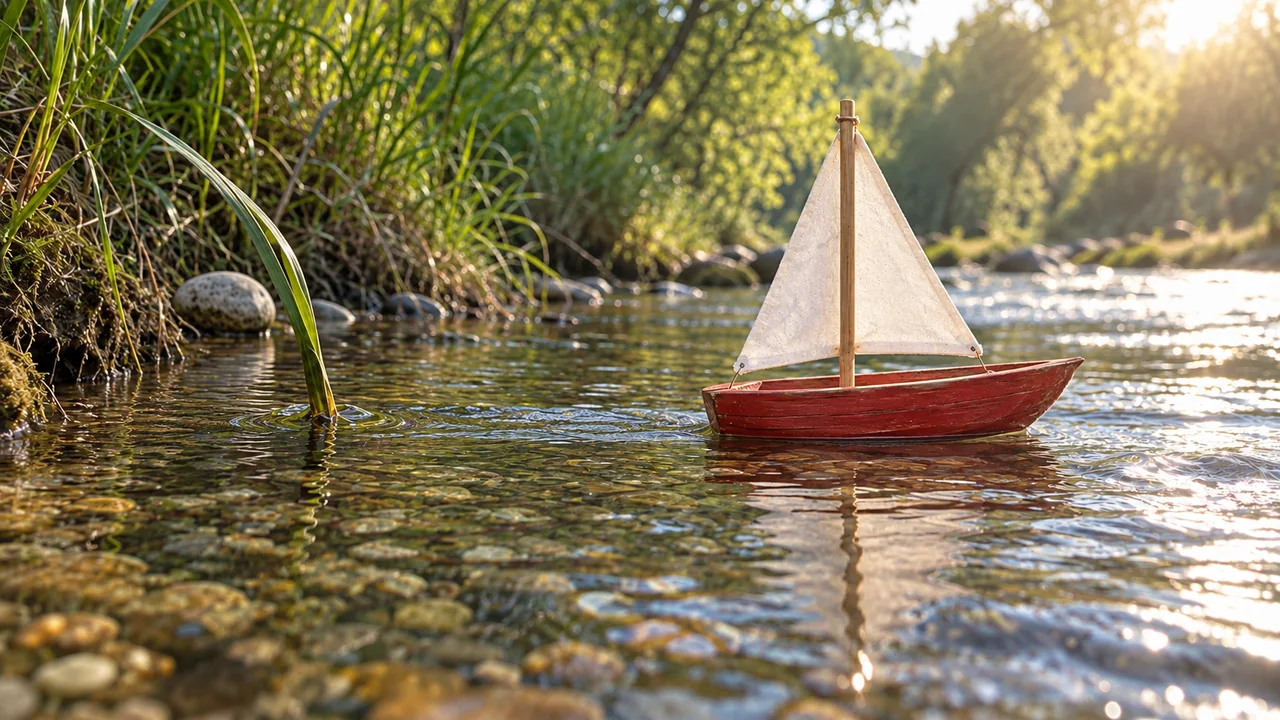
Use the attached stream image for the same boat and location. Create one wider photograph from the same bank. The identical red toy sailboat with one plain white triangular sail is now just clear of the reed, bow pointing screen-right. Leave a broad patch of sunlit open water on the right for its onward path. The bent reed and grey pebble stay near the left edge. Preserve the stream width, bank materials and sunlight from upper right.Put the three stills in your editor before generating video. Play them as a rough slideshow. If you cannot understand “caught, released, travelling” from these images and the planned action, repair the storyboard now. Also check that the close-up has not reversed the boat or moved the pebble in front of the reed.
If a detail drifts, revise the image with a narrow instruction:
Correct only the sail in this scene using the master reference: restore one plain white triangular sail on the original single mast. Preserve the red hull, its screen-right direction, the reed, pebble, water level, camera position and light. Return a single corrected still.3. Animate in Higgsfield with one generation per shot
Choose Kling 3.0 in the video workflow if your account offers it, attach the appropriate start frame and keep this exercise to a continuous shot. Higgsfield documents optional start/end frames and a separate audio toggle. Leave the end frame unset here; it would add another requirement before the basic motion works. Generate silently and add the stream sound in the edit. Kling 3.0 on Higgsfield
Settings: target eight seconds per generation, 16:9 and an available draft resolution. Use the duration the selector actually allows; retain the edit targets separately. Check the displayed charge before each take.
Shot 1, input: wide master.
The boat rocks very gently on the shallow water while its bow remains resting against the reed. Small ripples move downstream from screen-left to screen-right. The camera stays completely still. Preserve the boat, sail, reed and pebble from the start image. The boat does not advance yet.Shot 2, input: approved close-up.
A small pulse of water lifts the boat slightly and carries it screen-right until its bow clears the reed. The reed bends a little with the water and settles back. Keep the camera locked. The hull stays on the water surface and the sail remains attached to the mast. One continuous release, at a gentle natural speed.Shot 3, input: approved destination still.
The boat drifts slowly screen-right into the patch of sunlit water. A small wake follows its stern and fades. The camera remains locked on the stream. Preserve the boat's shape, sail and direction; the reed and pebble remain fixed behind it. Continue the same calm flow throughout the shot.If Kling is unavailable, Krea documents Hailuo 2.3 with a start image. Use it for all three clips with supported durations and trim in the edit. If the Higgsfield image route is also unavailable, Krea documents reference instructions with Nano Banana for preparing the stills. These are alternate routes to test, not promises that different models reproduce identical motion. Krea video, Krea image references
Make the release readable in the edit
Download the selected clips, arrange them in order and look at the hull position on both sides of each cut. For the second cut, the last close-up frame should show the bow clear of the reed; the wider shot can begin a little farther downstream. Avoid cutting from a trapped boat directly to a distant boat with no release visible.
If the reed tunnels through the hull, regenerate shot 2 with a smaller release distance. If the boat accelerates unnaturally, reduce the requested travel and keep the action within the shallow area. If the release remains unreliable, choose a different take or revise the obstacle before making more expensive versions.
Use straight cuts and one continuous stream ambience you own or have permission to use. Match white balance and water brightness between clips, then export 16:9 at a supported source resolution and consistent frame rate. Check the exported file for a missing sail, a reversed wake or an abrupt sound change. The camera movement exercise is a useful next step once the story reads with a locked camera.
Planning questions
Can this be one multi-shot generation?
Some models offer multi-shot modes, including the documented Kling 3.0 workflow. Separate clips let you replace only the release shot here. That control is the point of this exercise.
Why use no characters or dialogue?
The boat exercise isolates spatial continuity and cause and effect. Add faces after those work; the consistent-character guide covers that extra dependency.
Does every clip need its own motion prompt?
Yes. Rocking in place, clearing an obstacle and moving onward are different actions. Reusing “cinematic boat shot” would remove the distinction that carries the story.
How many credits should I reserve?
Read the current charge for your selected model and duration, then plan for at least one rejected take per difficult shot. This is a budgeting exercise, not a measured success rate or a quoted package price. Compare supported workflows in the image and video finder.
Sources
Official pages checked September 9, 2026; the exercise has not undergone hands-on generation testing in Higgsfield or Krea.