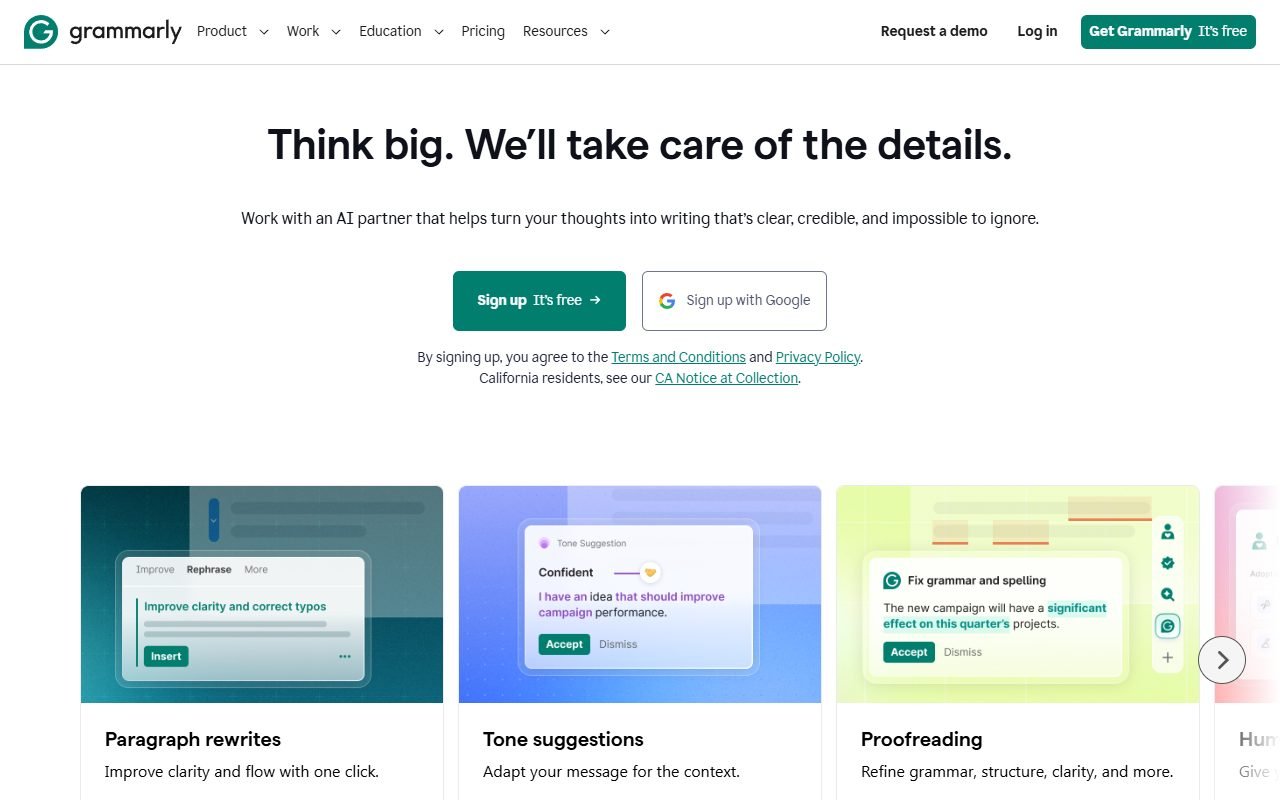
Grammarly is worth evaluating if you write English across email, documents, and work apps and want help in those contexts. Tone suggestions and rewrites can change meaning, conditions, or the level of certainty in a message, so accepted edits still need review.
Try it on the writing you actually send and record how often accepted suggestions need correcting. Official sources and external reviews were checked on 1 August 2026. PickByTask has not tested the product, and Thai-language quality remains unverified.
Contents — jump to a section
Straightforward answer: Is Grammarly right for your job?
Consider Grammarly if your bottleneck is “Know what to say. But it's a waste of time to check English every time before sending.” For example, a manager who answers emails from foreign customers. Marketers who edit landing-page copy or teams that need to keep the tone close to each other. The tool becomes even more valuable when used as a review layer between draft and approval.
If you have to write mainly in Thai Want to translate the entire document or wanting the AI to research facts and provide citations, those are not strong enough reasons to apply for Grammarly Pro on their own. You should compare tools built directly for that task.
How does Grammarly work differently from a normal grammar checker?
Grammarly's plans page specifies both editing and editing. spelling/grammar, tone adjustments, full-sentence rewrites, and some AI functionality, with use in many apps and websites Grammarly Plans The value lies in the loop. “Check while writing” rather than copying text to check after finishing.
But multi-app coverage has another side: IT teams need to know in what context an extension or desktop app is accessing messages. Can it be disabled on sensitive websites? And to what extent is organizational policy allowed for use with CRM, HR, or legal drafting systems? This matter must be checked by privacy/security documentation and actual settings It should not be concluded from the word enterprise-grade just one word
 Visit Grammarly ↗
Workflow with obvious benefits: One English email
Suppose a user drafts an email informing a client that a project is delayed. The first step is to write down all the facts, the new day, and the team's responsibilities. Then, let Grammarly spot any grammar mistakes and difficult-to-read sentences. Finally, writers must check that rewrites do not reduce their responsibility. Don't add testimonials. and do not change the delivery date
Therefore, it is not a reasonable indicator. “How many points can be fixed?” But it is the time from draft to email that the recipient understands on the same page. The number of accepted suggestions that had to be revised and the number of factual/tonal errors that were later discovered by the reviewer.
Key Features: Separate what actually helps from what looks exciting.
Grammar and spelling suggestions are good for basic errors, while clarity/rewrite is good for basic errors. Suitable for long sentences or direct translations from Thai. But there's a higher risk because the system taps into structure and tone. Tone assistance helps reflect whether the message might sound harsh or uncertain. But I don't know all the business relationships.
Generative AI helps draft and adjust text according to the permissions of the Grammarly Plans. A safer job is to ask for multiple options and let people choose. A riskier task is having the system fill in product information, numbers, or conditions that the prompt doesn't provide.
Free vs. Pro: Judgment by type of advice It's not a complete desire.
The Free plan is great for proving whether or not you accept the suggestion layer method. Before paying for a Pro, take a sample of your work for a week and separate out how many times basic suggestions were used, how many rewrites/tones were used, and which suggestions were rejected. If most of the work ends with a few spelling fixes, Free might be enough.
The current pricing page should be the only reference for prices, billing cycles, and AI rights because plan names and feature inclusions have changed. Grammarly Plans Don't insert old prices from reviews into your budget without checking the date. And don't interpret the annual monthly payment price as a monthly payment obligation.
Visit Grammarly ↗Grammarly for teams: Problems don't end with correct writing.
Teams should ask about style guides, brand terms, role-based controls, analytics, and user management. It's not just about buying more seats. Setting unclear rules may mean that everyone gets the same advice but the message isn't the same. Because people accept or reject suggestions differently.
The use case that should be tested is an internal announcement. One sales email and one paragraph article Have three members solve it using the same guideline and see the consistency. Collision with jargon and time spent by admins maintaining the system
Thai language: Don't jump to conclusions from the word multilingual.
Grammarly is famous for English. But the question of Thai readers is often “Can you help Thai people write English well?” This is different from “Can you write Thai well?” The first case requires testing errors from direct translation, such as articles, tense, preposition, and level of politeness. In the latter case, Thai text must be tested directly.
PickByTask does not yet have a fixture that records all results. Therefore, it is not guaranteed in both cases. Test work should include a polite email address. Customer service message and short copy with brand name/number With an English language examiner who can explain the reasons for the corrections.
Privacy and security: Check according to the type of information to be printed.
The Plans page references SOC 2 Type 2 and security measures Grammarly Plans, but enterprise purchasers must also review the current Privacy Policy, security document, and DPA to review retention, training controls, subprocessors, data residency, and data deletion.
Don't test with real customer data on day one. Create a dummy message with no personal information first. Then have the data owner or legal department approve the scope of websites/apps where the extension runs. Accreditation does not replace internal settings and policies.
User reviews: Unique strengths But it should not be made into a total score.
G2 has a large review base and an easy-to-use theme. Correct language in regular work and works across apps, while Capterra helps view business user context, while Trustpilot provides accounting signals. Billing and services, which may have a different tone from verified-software platforms
Product Hunt reflects the early-adopter/tech audience, and communities like Reddit search help find specific cases. But be wary of promotional posts or experiences that cannot be verified. Capterra, GetApp, and Software Advice have their own review ecosystems. Therefore, it should not be considered as three independent consensuses. We therefore summarize them by theme, not by averaging stars.
Visit Grammarly ↗Limitations that affect decision making
The first is overcorrection: a sentence might be better but loses its personality or accuracy. The second is suggestion fatigue, when there are so many underlines that the user automatically accepts. Third is Pro's worthiness, which depends on how well you actually use advanced suggestions.
Another point is dependency. If the team believes that text without underlining is correct. The system does not check the truth. Completeness of the offer or legal consequences Content approvers are still required.
Compare Grammarly, QuillBot and LanguageTool
| criterion | Grammarly | QuillBot | LanguageTool |
|---|---|---|---|
| Initial work | Check and adjust text while writing. | paraphrase/summary and writing tool set | Check grammar/style |
| Important test points | Accuracy of suggestions in real apps | Preserving meaning after rewrite | Supported languages and integration |
| Risk | Accept the rewrite and the meaning changes. | paraphrase far from original | Advanced features may not cover workflow |
| suitable when | Write in English all day on many channels. | Need to adjust sentences or summarize frequently | Need a grammar layer that focuses on multiple languages |
This table is a trial framework. It's not a winner decision. Use the same thread and count correct corrections. A solution that loses meaning and the time it takes until approval
Who should choose? Who should pass?
Choose to try Grammarly when English is part of your daily work and you need feedback on the spot as you type. Use Free to create a baseline, then move to Pro when usage data shows that advanced suggestions consistently save you time.
Pass or postpone purchase If you write in English only rarely The main work is in Thai or the policy does not allow extensions to process messages in important systems. In that case, it may be easier to control the scope by hiring a dedicated editor or using a tool that works on a piece-by-piece basis.
FAQ only questions before applying
Can Grammarly translate instead of a translation tool?
It should not be chosen for this reason alone. The main point is to help write and check text. You should use a specialized translation tool and check the meaning separately.
When is Pro worth more than Free?
When advanced rewrite, tone and additional capabilities are used in production often enough to reduce review times by more than the cost of the subscription. Measured by your work Not a list of features
Can this be used with secret emails?
Must pass the organization's policy and check. privacy/security settings first. Do not assume from the installation that this is allowed.
Does Grammarly fact check?
Suggestions in language are not factual verification. Names, prices, dates, and claims must be verified from the source.
If you cancel, will your work be lost?
Current account requirements and behavior must be verified with a live trial before giving a general answer.
Data sources and evidence status
Official: Home · Plans · Privacy · Terms · Security
External: G2 · Capterra · GetApp search · Software Advice search · Trustpilot · Product Hunt · Reddit search
External review sources used in this synthesis
These links represent external reviewers or users, not PickByTask endorsements. Read them alongside official facts, checked dates, and any conflicting evidence.
- 1. https://www.g2.com/products/grammarly/reviews
- 2. https://www.capterra.com/p/178116/Grammarly-Business/
- 3. https://www.getapp.com/search/?q=Grammarly
- 4. https://www.softwareadvice.com/search/?q=Grammarly
- 5. https://www.trustpilot.com/review/www.grammarly.com
- 6. https://www.producthunt.com/products/grammarly/reviews
- 7. https://www.reddit.com/search/?q=Grammarly%20review